
Storyboard-First AI Video vs Prompt-and-Pray Generators
Two production cultures dominate AI video right now. Prompt-and-pray types a wish, hits generate, and hopes. Storyboard-first locks the teach sequence…
Storyboard-First AI Video vs Prompt-and-Pray Generators
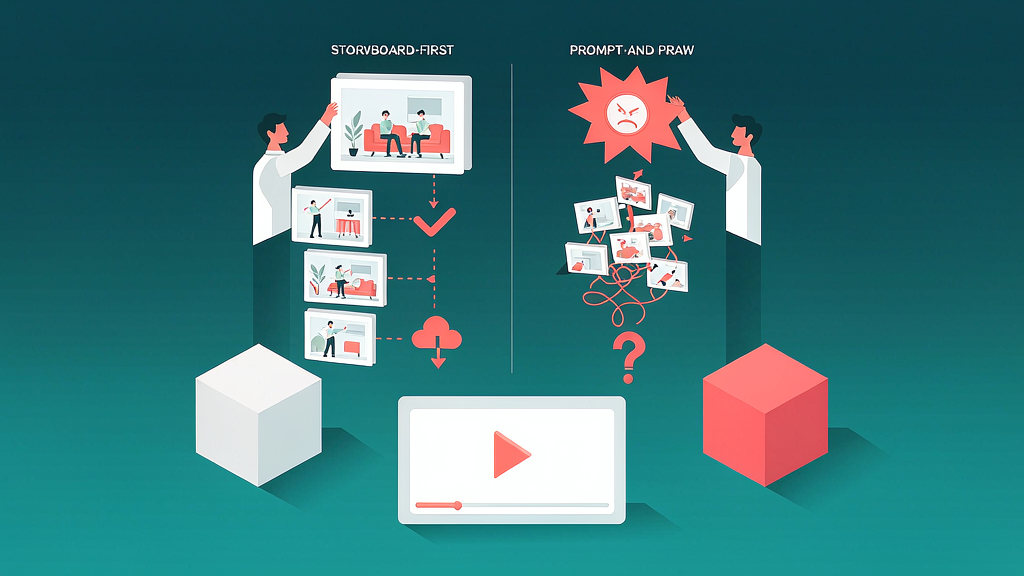
Two production cultures dominate AI video right now. Prompt-and-pray types a wish, hits generate, and hopes. Storyboard-first locks the teach sequence and key visuals before expensive motion renders. For brand explainers and educational Reels, the second culture wins on cost, clarity, and risk.
Definitions
Prompt-and-pray: prompt → video clip → dislike → regenerate → repeat. Structure emerges accidentally.
Storyboard-first: brief → beat sheet → per-clip scene/VO → approve stills → render clips → compose Reel.
Cost physics
Motion seconds are the expensive unit. Still frames and text edits are cheap. If your process discovers the message during motion regen, you are paying cinema prices for draft thinking.
Storyboard-first moves discovery upstream:
- Fix the promise in text
- Fix the visual nouns in stills
- Pay for motion once (or twice), not twelve times
This is the core reason tools like Scro emphasize keyframe approval.
Quality physics
Explainers fail from:
- Too many ideas per second
- VO fighting the picture
- Off-brand worlds between clips
- Unclear CTA
None of those are fixed by a “better diffusion sample.” They are fixed by beat design.
When prompt-and-pray is fine
- Mood boards
- Personal experiments
- Disposable social jokes
- Searching for a visual metaphor you’ll later storyboard
Use it for ideation—not for shipping brand-critical teach content.
Migration plan for teams stuck in regen hell
- Ban “final render” until a one-page beat sheet exists
- Require still approval in Slack/Loom
- Cap regenerations per clip (e.g. 2) before rewriting the guideline
- Measure cost per published Reel, not cost per pretty accident
Comparison table
| Dimension | Prompt-and-pray | Storyboard-first |
|---|---|---|
| Unit of work | Full video regen | Beat / still |
| Where errors die | After render | Before render |
| Cost driver | Retries | Briefing quality |
| Best output | Surprise aesthetics | Teach fidelity |
| Team skill | Prompt craft | Pedagogical briefing |
| Season consistency | Hard | Designed-in |
Worked migration: one marketing pod
Before: PMM types a paragraph into a cinematic generator, regenerates 12 times, picks the “least wrong,” publishes. Support tickets follow when UI is invented.
After (two-week change):
- Job line template mandatory in the brief doc.
- Five-beat sheet required before any generate click.
- Still contact sheet reviewed in Slack with beat IDs.
- Motion credits usefuled only after emoji lock from PMM + design.
- Retries require a written brief change—not “try again.”
Result pattern teams report: fewer renders, more shippable cuts, slower first experiment, faster tenth accurate explainer.
Decision tree
- Need a mood plate or B-roll texture? Prompt-and-pray is fine.
- Need a viewer to do a job correctly after watching? Storyboard-first.
- Need both? Generate plates freely; keep the teach spine on a board.
Credit economics (no invented prices)
Track for 30 days:
- Generations per approved explainer
- Hours of human review per approved explainer
- Factual correction incidents after publish
If generations rise while incidents stay flat or climb, you are buying noise.
Meeting script (10 minutes)
“We are not banning exploration. We are separating exploration credits from production credits. Production requires a board and still lock. Exploration can be messy. Production cannot.”
Stakeholder email (copy)
Subject: Stills ready for lock (48h) Please comment by beat ID. Factual accuracy first. Motion starts after written lock. Credits after lock are change-order territory.
Distribution checklist
- Captions designed for muted autoplay
- Safe zones checked on a real phone
- First comment link / SKU details
- UTM or unique landing where relevant
- Day-3 and day-7 metrics logged
Related reading on Scro
- What Is Storyboard-First AI Video Production?
- Best AI Video Generators for Coaches Who Teach on Reels
- AI Video Prompt Guide for Realistic Marketing Explainers (Brand-Safe)
- AI Video Tools Comparison for Marketing: Runway, Pika, Kling, and Storyboard Platforms
Operating checklist for this topic
- Write one job line before any generation
- List must-show visual references with links or file names
- Draft five to seven teach beats with spoken lines ≤18 words each
- Approve stills before motion credits useful
- Ship with captions, one CTA, disclosure if needed, and a verification date
- Log what you will change after three publishes
Anti-patterns to ban
- Regenerating motion to fix a brief problem
- Measuring success only as video count
- Skipping disclosure when using photoreal synthetic people
- Publishing UI or pack claims you did not verify
- Adding a sixth proof beat "just in case" after still lock
- Rewriting the job line silently during render week
Worked mini-example
Job line: teach one reversible mistake viewers already feel. Proof A: show the broken artifact (real photo or UI). Proof B: show the corrected method. Recap: three-step card. CTA: save or open the checklist.
If viewers save but do not click, your teach may already be complete—offer a Part 2 rather than stuffing more CTAs.
Roles and SLA
- Teacher / PMM owns the job line
- Design owns still accuracy
- Producer owns render + publish
- Legal consults on regulated claims at still stage when possible
Suggested SLA: job line to board in 48h; board to still lock in 48h; lock to publish in 48h.
Field notes and cleanup
Revisit after three related ships. Keep a changelog: job line, proof frames, retention notes, next change. Schedule quarterly cleanup for drifted product truth. Unpublish or rebuild rather than leaving inaccurate teach live.
Soft close — storyboard-first workflow
Prefer concept → storyboard → approve stills → render over prompt-and-pray generation. If you want that loop productized, try Scro. The operating rules above still apply with any stack that lets you lock beats before motion credits burn.